
Fake Windows 10 Update
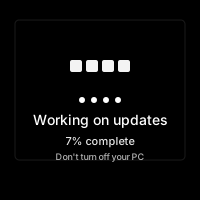
Working on updates 7% complete.
Don't turn off your PC. This will take a while.
Your PC may restart several times
🪟 Fake Windows 10 Update Screen
Transport any PC back to the era of teal backgrounds, friendly typography, and endless “Don’t turn off your computer” warnings.
🎨 Pixel-Perfect Nostalgia
We cloned the genuine Windows 10 update UI—same spinner, same copy, same glacial progress bar.
The simulator features the familiar dark teal gradient with Segoe UI text that updates every few seconds. The progress percentage climbs realistically but never quite finishes. Additional lines such as “Working on updates 27%. Don’t turn off your PC. This will take a while.” rotate automatically to reinforce authenticity.
🔄
Looping Spinner
The signature dot circle animation runs at the same cadence as native Windows 10 screens.
⏳
Dynamic Messages
Message queue cycles through update stages (“Installing features,” “Cleaning up”).
📉
Stalled Percentages
Configurable pace lets you freeze at 99% for maximum suspense.
🕵️
Fullscreen Camouflage
Automatic cursor hide and black background make it indistinguishable from actual servicing screens.
🎯 Best Use Cases
- Office Delays: Need ten extra minutes before a meeting? Boom—“Updates were scheduled.”
- Family Fun: Start it on your sibling’s gaming PC before raid night.
- Workshop Icebreaker: Trainers use it to talk about patch management and downtime.
- Content Skits: Create TikToks about “the update that stole my afternoon.”
🚀 Quick Playbook
1
Enter Fullscreen
Press F11. If you’re on Windows, the wallpaper disappears and the prank becomes indistinguishable from reality.
2
Adjust Brightness
Lower the display a little; update screens often dim to conserve energy.
3
Set The Scene
Leave a sticky note: “Started update at 2:37 PM, please don’t touch.” Instant credibility.
4
Let It Run
Percentages crawl slowly. People will keep glancing, hoping for 100%.
5
Reveal Kindly
Before anyone reboots the machine, exit fullscreen and enjoy the collective sigh of relief.
🧠 Why It Works
Windows updates are universally recognized. People have lost hours to them, so they experience authentic visual response when they see the screen. The friendly yet firm copy (“Sit back”) creates authentic system authenticity that users recognize.
🧾 Tips & Tricks
- Audio Cues: Play the Windows “device disconnected” sound beforehand to imply the PC restarted.
- Multiple Displays: If running on dual monitors, mirror the prank on both to avoid suspicion.
- Schedule Story: Say “IT rolled out 22H2” for extra realism.
- Use On Tablets: Surface devices make the update feel 100% legit.
❓ FAQ
Does it actually update Windows?
No. It’s a webpage with zero privileges over your OS.
Can I change the text?
Yes. Inspect the text nodes and replace them with inside jokes (“Installing Snack Drivers”).
Will it run offline?
Keep the tab open and it keeps animating even without internet connectivity.
What if someone forces a restart?
Luckily nothing dangerous happens. Still, reveal before they hold the power button.
🧩 ARG & Horror Hooks
- Hidden Messages: Flash subliminal text (“we see you”) for one frame every few seconds.
- Possessed TV: Slowly morph the static into a face using the glitch controls.
- Channel Surf: Toggle between static and live video to pretend something is hijacking the feed.
🛌 Sleep & Focus Mode
Believe it or not, some listeners use white noise to fall asleep. Reduce the brightness, switch to grayscale, and set the audio to a gentle hiss. Instant retro sound machine for late-night coders.
📘 Real-World Case Files
- Conference Delay: An event organizer projected the update screen before a keynote to buy five minutes. Attendees laughed and shared photos, turning a stall into a meme.
- Family Game Night: Parents launched it on the living room PC and told kids the system was “optimizing pixels.” Everyone ended up swapping childhood update horror stories.
- Productivity Hackathon: A team used it as a playful timer: when the fake update hit 50%, everyone had to swap tasks. Chaos, but effective.
🎙️ Debrief Lines
Prep quips for the reveal so the prank ends on a collaborative laugh. “Great news, the updates installed a sense of humor,” or “Turns out the progress bar was measuring our patience.” Collect your audience’s best comebacks and add them to a shared doc for future mischief.
🧾 Operator Checklist
Build a laminated card with boxes to tick: Fullscreen? Brightness dropped? Sticky note planted? Excuse rehearsed? Running through the list feels like prepping a rocket launch and keeps the execution tight even when you’re nervous.
🔊 Soundboard Companion
Line up Windows system chimes, USB disconnect bleeps, and the famous “device connected” tone on a nearby phone or Stream Deck. Trigger them right before revealing the prank to mimic a reboot finishing. Audio sells the illusion, especially in conference rooms.
📰 Intranet Bulletin
Draft a fake company-wide announcement about “mandatory updates” and schedule it to send right after the reveal. Coworkers will connect the dots and appreciate the dedication to bit-building.
📈 Debrief Analytics
Track how long each audience waits before intervening, then chart the averages. You’ll discover fun data points (“Design team waits longest,” “Night shift restarts immediately”) that inform future pranks.
🛠️ Operator Playbook
- Room Scan: Confirm no deadlines are looming.
- Prop Drop: Place a fake IT ticket under the keyboard.
- Cover Story: Memorize a line about “security patch KB9001.”
- Exit Strategy: Decide who you’ll reveal it to first and what snack you’ll offer as apology.
- Knowledge Share: Email the link and your analytics board so the prank lives on.
🎭 Support Desk Skit
Partner with a friend who pretends to be on a speakerphone from “corporate IT.” They walk the room through absurd troubleshooting steps (“Please hum the Windows startup tune”). The dialogue keeps bystanders engaged even when the progress bar barely moves.
📅 Incident Calendar
Create a fake wall calendar that charts legendary “update outages” for your group. Mark squares like “Jan 12 — Snack Bar PC stuck at 14%,” “Mar 3 — Conference Room rebooted mid-vow renewals,” and add stickers whenever a new prank unfolds. Reviewing the calendar before each deployment builds ritual, encourages story continuity, and guarantees you’ll never repeat the same cover story twice.
📝 Debrief Board
Stick a whiteboard next to the monitor and jot down “Findings” as spectators shout them out (“Dots sped up at 43%,” “IT hotline on lunch break”). Snap a photo before erasing; the board becomes an instant meme for company chat and a reference sheet for future pranks.
⚠️ Friendly Fun Only
Fake downtime is hilarious when everyone’s workload can pause for a minute. Don’t run it during mission-critical operations, and always show targets how to escape.
Common Use Cases:
Film & Video Production
Use authentic interface simulations as background visuals and set dressing in film and video production. Perfect for any scene requiring computer screens.
- Cinematic computer screen effects
- Movie and commercial production backgrounds
- Professional visual content creation
Educational & Security Training
Use interface simulations for cybersecurity awareness training and educational demonstrations in schools and corporate settings.
- IT security awareness programs
- Computer science education demonstrations
- Technology history classroom materials
Stream & Content Overlays
Add professional interface elements and visual effects to Twitch streams, YouTube videos, and other content creation platforms.
- Stream overlays and visual effects
- YouTube video production content
- Professional streaming backgrounds
UI/UX & Design Reference
Study and reference authentic operating system interfaces, terminal designs, and error message layouts for UI/UX design and development projects.
- Interface design reference materials
- Developer learning and experimentation
- Historical technology study
Retro Computing & Nostalgia
Explore and experience authentic recreations of classic operating systems and interfaces. Perfect for tech enthusiasts and nostalgic exploration.
- Experience classic OS designs
- Technology history exploration
- Retro tech appreciation
Web Development Learning
Explore advanced web development techniques, creative coding patterns, and interactive visual effects for professional projects.
- Advanced CSS and JavaScript techniques
- Interactive animation patterns
- Professional effect development
How to Use These Simulations
Follow these simple steps to get the most out of our interface simulations
1
Choose Your Simulation
Browse our collection of high-fidelity interface simulations and select one that matches your creative or educational needs. From classic OS designs to modern system interfaces, pick what fits your project.
2
Open in Your Project
Launch the simulation on the device where you need it. You can open it on your own device for review, or integrate it into your creative project, presentation, or educational material.
3
Enjoy the Simulation
Experience the authentic visual effects and immersive interface. Explore the interactive elements and appreciate the high-fidelity recreation of classic or modern computing interfaces.
4
Exit Anytime
You can exit the simulation at any time by pressing ESC or F11. All simulations run entirely in your browser with no system interaction or device modifications.
5
Share Responsibly
If you record or share content featuring these simulations, do so responsibly. Always credit PranxWorld and disclose that these are visual simulations for educational or creative purposes.
6
Explore More
Try different simulations! Each one offers unique visual effects and interface experiences. Mix and match to find the perfect simulation for your needs.
💡 Professional Tips for Best Results:
- Full screen for immersion - Press F11 for maximum visual impact in presentations or video production
- Use in appropriate contexts - Best suited for film production, streaming, education, and creative projects
- Transparency matters - Clearly disclose that these are simulations when used in any public-facing content
- Obtain consent - If used in live demonstrations or recordings, ensure all participants are informed and consent
- Test beforehand - Verify compatibility and appearance on your target device and browser
- Respect boundaries - Use only in appropriate professional and educational settings