
Blue Screen of Death
:(
Your PC ran into a problem and needs to restart. We're just collecting some error info, and then we'll restart for you.
0% complete

For more information about this issue and possible fixes, visit https://www.windows.com/stopcode
If you call a support person, give them this info:
Stop code: CRITICAL_PROCESS_DIED
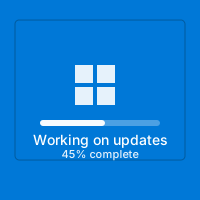


💥 Blue Screen Of Death Simulator
The quickest way to turn a calm office into a command center? Flash the big sad face, the QR code, and that memorable line: “Your device ran into a problem.”
⚡ Instant Heart-Stopping Credibility
Microsoft’s crash screen is universally recognized. One glance and people assume files are gone.
The simulator mimics the modern Windows 10/11 BSOD down to the exact hue (#0078D7), Segoe UI type, emoticon placement, and QR code. The copy references innocuous stop codes (“MEMORY_MANAGEMENT,” “CRITICAL_PROCESS_DIED”) to keep it believable yet harmless. Because the layout is so iconic, even Mac and Linux users identify it immediately.
😢
Authentic Sad Face
The oversized emoticon and friendly wording mirror the real crash dialogue introduced in Windows 8.
📱
Scannable QR Art
An actual QR code points to a harmless help page, just like the real diagnostic link.
⏱️
Percentage Counter
The fake “Collecting error info” meter crawls from 0% to 100% and loops, making viewers wait for the restart.
🔍
Selectable Stop Codes
Use preset stop codes or drop your own inside DevTools if you want an inside joke (“DRIVER_IRQL_NOT_LESS_OR_EQUAL”).
🪄 Execution Playbook
This simulator hits hardest when the room is quiet and productive.
1
Prep The Device
Open the simulator, press F11, and dim the monitor slightly. Hide the mouse at the corner so no cursor is visible.
2
Leave The Room
Step away for a minute. Let your coworkers “discover” the crash organically.
3
Eavesdrop
Listen as they debate whether to force-restart, unplug, or call IT. The conversations are priceless.
4
Reveal Before Distress
Return with a grin, hit Esc, and show them it’s a browser tab. Relieved laughter follows.
🎯 Where It Shines
🏢
Workplace Laptops
Great for April Fool’s or farewell parties. Just avoid mission-critical machines.
🎥
Video Shoots
Filmmakers drop this on monitors when they need a story beat showing everything “crashing.”
🧑🏫
Tech Talks
Speakers start with a fake crash, let the groans ripple, then use it as a segue into reliability topics.
🎮
Gaming Nights
Launch it during a LAN party while someone’s chair is empty. The entire room erupts.
🧠 Why The BSOD Lives Rent-Free
Blue screens marry surprise and familiarity. They are rare enough to be noticeable, common enough that everyone knows the experience. The simple white text on blue feels official, the QR code implies telemetry, and the friendly emoticon is almost ironic. This simulator taps that emotional response without touching a single system file.
The copy even references Windows’ modern crash etiquette (“We’re just collecting some error info, and then we’ll restart for you”). People have read that sentence verbatim during real crashes, so the déjà vu sells the prank.
🧵 Recovery Story Circle
After revealing the joke, host a lightning round where everyone shares their most dramatic real-life crash recovery. Give prompts like “What’s the fastest you’ve restored from backup?” or “Which app did you reopen first?” Recording the stories (with permission) turns the prank into an oral history session while reminding the group why good backups matter.
🧾 Performance & Safety Tips
- Use External Displays: Plug into a projector or TV for larger-than-life drama.
- Pair With Sound: Play the Windows error bong quietly in the background before revealing the screen.
- Set A Boundaries Timer: Never let the prank go longer than a couple minutes—nobody likes losing actual work.
- Be Transparent Afterward: Show them that refreshing the tab resets everything. Trust is key.
❓ FAQ
Does this crash my computer?
Never. It’s purely visual. Your apps keep running under the browser window.
Can I change the stop code?
Yes. Inspect the element labeled
.stop-code and swap the text with any phrase you like.Will it fool IT pros?
Many glance, gasp, then realize it’s missing the Windows watermark. Demonstrates the effectiveness of realistic simulations. Use fullscreen to delay detection.
Does it work offline?
Load it once, keep the tab open, and you can run the prank without internet. Perfect for conference rooms with spotty Wi-Fi.
📚 Mini Case Studies
Startup Stand-Up: A SaaS team projected the BSOD right before demo day, then surprised investors by revealing the prank and launching into a talk about resilience engineering. The fake crisis broke the ice better than any slide could.
Gaming Café Chaos: One LAN center ran the simulator on every idle station overnight. Customers walked in thinking a power surge fried the rigs, only to be handed branded stickers reading “We survived the crash.” Free marketing!
Parenting Win: A dad used the blue screen to teach his kids why backing up homework matters. After the reveal, he walked them through cloud sync—lesson learned with zero tears.
🧰 Post-Prank Aftercare
- Reopen Apps: Help your target reopen whatever they were using so no actual productivity is lost.
- Share The Tool: Send them the link plus tips on running it safely—spreads goodwill.
- Debrief Morals: Talk about how real crashes feel and what backups they rely on. Prank + education = win.
- Set Boundaries: Ask if they mind future tech jokes. Respect goes a long way.
📑 Incident Report Template
For enhanced entertainment, keep a faux “IT ticket” clipboard nearby. Jot down the imaginary downtime, fake ticket number, and “root cause” (“Operator spilled latte on keyboard matrix”). Reading it aloud after the reveal turns Awe into storytelling.
- Timeline: Document when the “crash” was spotted, when the hero (you) intervened, and how long recovery took.
- Impact: Invent over-the-top consequences (“Lost 12 seconds of productivity, morale shaken but recoverable”).
- Action Items: Suggest whimsical fixes like “Install anti-prank policy” or “Schedule meme training.”
🎥 Filming Advice
Set your phone to manual exposure so the blue stays rich on camera. Capture B-roll of the percentage counter, then pan to coworkers’ reactions. Edit the shots into faux IT training videos (“How we handle critical failures”) and insert the reveal at the end.
🧪 Crash Drill Workshop
After the prank, walk everyone through a real incident-response checklist: save work, sync files, reboot gracefully. The juxtaposition of momentary surprise and real best practices reinforces healthy habits.
🖼️ Set Dressing
Add sticky notes with scribbled stop codes, stack dusty manuals, and tape a “Do Not Reboot” sign to the monitor. These small props photograph beautifully and make the illusion feel like a staged IT diorama.
🛡️ Responsible Pranking
Blue screens trigger genuine stress. Aim for laughs, not ruined days. Avoid saving-critical moments, reveal fast, and help your target reopen their real apps afterward.
Common Use Cases:
Film & Video Production
Use authentic interface simulations as background visuals and set dressing in film and video production. Perfect for any scene requiring computer screens.
- Cinematic computer screen effects
- Movie and commercial production backgrounds
- Professional visual content creation
Educational & Security Training
Use interface simulations for cybersecurity awareness training and educational demonstrations in schools and corporate settings.
- IT security awareness programs
- Computer science education demonstrations
- Technology history classroom materials
Stream & Content Overlays
Add professional interface elements and visual effects to Twitch streams, YouTube videos, and other content creation platforms.
- Stream overlays and visual effects
- YouTube video production content
- Professional streaming backgrounds
UI/UX & Design Reference
Study and reference authentic operating system interfaces, terminal designs, and error message layouts for UI/UX design and development projects.
- Interface design reference materials
- Developer learning and experimentation
- Historical technology study
Retro Computing & Nostalgia
Explore and experience authentic recreations of classic operating systems and interfaces. Perfect for tech enthusiasts and nostalgic exploration.
- Experience classic OS designs
- Technology history exploration
- Retro tech appreciation
Web Development Learning
Explore advanced web development techniques, creative coding patterns, and interactive visual effects for professional projects.
- Advanced CSS and JavaScript techniques
- Interactive animation patterns
- Professional effect development
How to Use These Simulations
Follow these simple steps to get the most out of our interface simulations
1
Choose Your Simulation
Browse our collection of high-fidelity interface simulations and select one that matches your creative or educational needs. From classic OS designs to modern system interfaces, pick what fits your project.
2
Open in Your Project
Launch the simulation on the device where you need it. You can open it on your own device for review, or integrate it into your creative project, presentation, or educational material.
3
Enjoy the Simulation
Experience the authentic visual effects and immersive interface. Explore the interactive elements and appreciate the high-fidelity recreation of classic or modern computing interfaces.
4
Exit Anytime
You can exit the simulation at any time by pressing ESC or F11. All simulations run entirely in your browser with no system interaction or device modifications.
5
Share Responsibly
If you record or share content featuring these simulations, do so responsibly. Always credit PranxWorld and disclose that these are visual simulations for educational or creative purposes.
6
Explore More
Try different simulations! Each one offers unique visual effects and interface experiences. Mix and match to find the perfect simulation for your needs.
💡 Professional Tips for Best Results:
- Full screen for immersion - Press F11 for maximum visual impact in presentations or video production
- Use in appropriate contexts - Best suited for film production, streaming, education, and creative projects
- Transparency matters - Clearly disclose that these are simulations when used in any public-facing content
- Obtain consent - If used in live demonstrations or recordings, ensure all participants are informed and consent
- Test beforehand - Verify compatibility and appearance on your target device and browser
- Respect boundaries - Use only in appropriate professional and educational settings